
OPENING
If you wear an Apple Watch to bed, it's already collecting sleep data on you every night. Heart rate, movement, time in each sleep stage — all of it. Most people either never look at it or see a number and shrug. This week we fix that. Two setting changes and ten minutes is all it takes to turn that data into something you'll actually check each morning. You bought the watch for its functions. Let us show you how to make them work for you - on your way to better health!
We've also got a new wearable worth knowing about — and some clarity on whether now is the right time to buy an Apple Watch or wait a few months.
HERO HEALTH DEEP DIVE
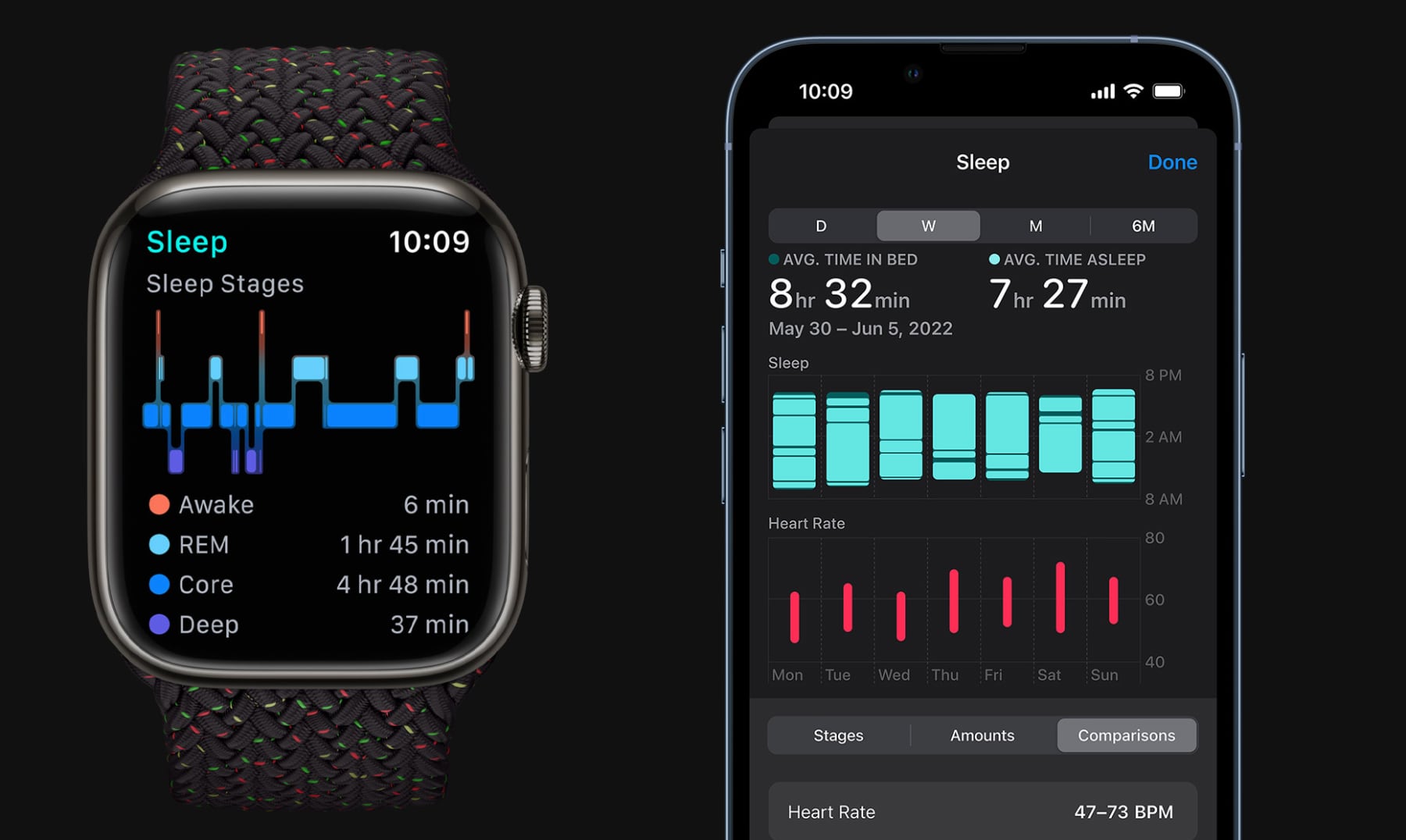
Apple Watch Sleep Score: The Two Settings That Actually Matter
What it does
Apple Watch tracks your sleep automatically every night you wear it to bed — heart rate, breathing, movement, and time in each sleep stage. It compiles all of this into a sleep score from 0–100. A score above 80 generally means you got enough quality sleep. Consistently below 70 is worth paying attention to, not panicking over.
Why this matters after 50
Poor sleep is directly linked to higher fall risk, slower recovery from illness, elevated blood pressure, and cognitive decline — all things that become more relevant with age. Your Apple Watch can't fix bad sleep, but it can surface patterns you'd otherwise miss: consistently low scores on nights you stayed up late, scores that drop after alcohol, or waking during what should be deep sleep. What you measure, you can fix.
10-minute setup checklist
- Open the Health app on your iPhone. Tap Browse at the bottom, then Sleep.
- Tap Set Up Sleep if you've never done it, or Full Schedule to update your sleep goal. Set it to the hours you actually want to sleep — 7 to 8 hours is a reasonable target for most adults.
- On your Apple Watch, go to Settings → Sleep → make sure Track Sleep with Apple Watch is turned on. Without this, the watch records nothing overnight.
- Back in the Health app, scroll down to Sleep Stages. If you're on watchOS 9 or later, you'll now see your time in Core, Deep, and REM sleep — not just total hours. This is the number worth watching.
- Set a Wind Down reminder in the Health app Sleep section. Even 15 minutes of no screens before your target bedtime will improve your scores over time.
- For the first two weeks, just observe. Don't change anything about your routine — let the watch build a baseline.
What to watch for each week
- A consistent score below 70, especially with low Deep Sleep, is worth bringing up with your doctor.
- Very low REM sleep (under 90 minutes) can explain why you feel foggy even after a full night.
- Compare your score to how you actually feel. If you score 85 but feel exhausted, your sleep goal may be set too low.
Limitations — who this isn't for
- Apple Watch sleep tracking requires charging during the day. If you can't reliably charge before bed, the feature won't work consistently.
- It does not diagnose sleep apnea or other disorders. If you snore loudly or wake gasping, talk to your doctor — this is not a substitute for a sleep study.
- The score is less accurate if the band fits loosely. Snug but comfortable is the right fit for overnight wear.
→ Apple Watch SE on Amazon — The most affordable Apple Watch with full sleep and heart health tracking. Starts at $249 and works with any iPhone.
SECONDARY FEATURE
Alexa Learned a New Trick: Audio Health Briefings On Demand
Amazon's Alexa Plus can now generate a custom audio podcast on almost any topic in minutes. Ask it something like "Alexa, make me a podcast about managing blood pressure naturally" or "Alexa, create an episode about home safety for aging parents" — and it plays back a short, produced-sounding audio piece tailored to your request.
Why this is useful for our audience
It's hands-free and screen-free. If you want to learn something while cooking, stretching, or getting ready in the morning, you can ask a health question and listen to a clear, structured response rather than reading an article. That's a genuine quality-of-life improvement for anyone who prefers audio over text or spends time in rooms without a screen nearby.
How to try it
You need an Echo device and an active Alexa Plus subscription ($19.99/month, or included with some Prime tiers — check your account in the Alexa app). Then just say: "Alexa, create a podcast about [your topic]."
Keep in mind
This is AI-generated content, not medical advice or journalism. Use it the way you'd use a quick web search — helpful for orientation, not for decisions. If it says something surprising, verify it with a reliable source or your doctor.
→ Amazon Echo Show 8 on Amazon — The clearest way to use Alexa at home. 8-inch screen, excellent speakers, no monthly fee for the device itself.
QUICK WINS
1. A Fitbit With No Screen — And That's the Point
Google's Fitbit brand just released the Fitbit Air: a slim band that tracks steps, heart rate, sleep, and stress — but shows nothing on your wrist. All data goes to your phone. No notifications, no glowing screen, no squinting at tiny numbers.
If you've always wanted health tracking without the "I'm wearing a medical device" look, this is worth considering. Early impressions describe it as the most comfortable wearable tested, largely because it's light and has no screen edge to catch on things. Price is around $100. Available now.
2. Apple Watch Is Getting Blood Pressure Alerts Later This Year
A credible report this week says Apple Watch Series 12 — expected in September 2026 — will include high blood pressure alerts. Not a full measurement like a cuff, but a notification if your watch detects patterns consistent with elevated blood pressure over time.
This is a big deal if blood pressure is a health concern for you or someone in your family. Practical implication: if you're planning to buy an Apple Watch in the next few months, consider waiting until September. If you already have a Series 8 or newer, you may receive this as a software update.
3. Should You Buy an Apple Watch Now or Wait?
With Series 12 about 4 months away, here's the simple version:
- Buy now if you're on Series 6 or older — you're missing significant health features that are mature and reliable today.
- Wait if you're on Series 8 or newer — the blood pressure and other new features will likely be worth it.
- Apple Watch SE is always the right call if budget is the main factor — it gets most software features and is significantly cheaper than the full series.
CLOSING
Sleep data that just sits on your phone isn't doing you any good. The setup above takes one session — do it tonight before bed and your watch will start building a real picture of your sleep this week.
As always, reply if you have questions, disagree with anything, or want me to dig deeper on a topic. I read every reply.
Until next week,
Bobby Holland ([email protected])